How Shiksha Reduced INP by 60–78% Across 200K+ URLs: A Frontend Engineering Case Study
How Shiksha reduced INP by 60–78% across 200K+ React URLs using Partytown, JS yielding, and rendering optimizations — from 500ms Poor to 219.48ms Good.
Introduction
Interaction to Next Paint (INP) measures how quickly a page visually responds to every user interaction — clicks, taps, keyboard input. Google considers anything under 200ms "Good." In Q1 2024, INP replaced First Input Delay (FID) as an official Core Web Vital, making it a direct ranking signal rather than a diagnostic metric.
For Shiksha, the timing was rough. INP optimization was already underway, but at the point of transition, INP sat above 500ms across virtually every URL on both desktop and mobile — firmly in the "Poor" zone. That's not a handful of problem pages. That's an entire platform.
This article documents how we approached INP optimization: which techniques moved the needle, what was already in place, what the data showed, and what we're still working through. The goal is a technically honest account, not a highlight reel. If you're trying to improve INP on a large React application, the specifics here — yielding patterns, Partytown, rendering reduction, CSR transition handling — are directly applicable.
The problem: what poor INP looks like at scale
Shiksha serves 200,000+ URLs across a range of page types: College Landing Pages (CLP), College Tab Pages (CTP), Admission/Cutoff/Placement/BrochureInfo Pages (ACP/BIP), Overview Pages (OVP), Single Institute Pages (SIP), Compare pages, SA-SIP, and Cutoff/Ranking/Placement bucket pages. Each page type has a different interaction profile and a different set of third-party dependencies.
At the start of this work, Google Search Console's Chrome UX Report data showed approximately 6,900 URLs in the Poor or Needs Improvement category for INP. The root causes, once we dug in, fell into four categories.
The single biggest culprit was Microsoft Clarity. Its heatmap recording ran entirely on the main thread, consuming a disproportionate share of CPU time during every session. GTM and Facebook Pixel added to the pile. Every user interaction was queuing behind whatever analytics work was in progress.
On top of that, the rendering pipelines included substantial synchronous JavaScript that ran without yielding. Long tasks blocked the browser from processing input until they finished.
Post-interaction renders were also triggering layout recalculations that compounded the delay. Some UI updates were running at high priority when nothing about them required it.
Mobile was a separate problem. Lower CPU headroom and variable network conditions meant desktop fixes didn't translate. The two platforms needed distinct diagnosis and separate baselines.
Main-thread blocking, in this context, means the browser's single rendering thread is occupied by a long JavaScript or layout task when the user tries to interact — so the interaction response waits in queue until that task finishes.
The optimization strategy
New work below is clearly marked. Baseline items were already in place before this INP push and are listed separately for attribution clarity.
JS execution optimization with yielding and startTransition (new work)
What we did: Non-user-critical JavaScript was deferred using a combination of scheduler.yield() and startTransition. Long synchronous tasks were broken into smaller chunks so the browser could handle user input between them. State updates that didn't need to block interaction were wrapped in startTransition to mark them as non-urgent.
Why it helps INP: INP is measured from the moment of interaction to the next paint. If the main thread is running a long task at that moment, the browser queues the response. Yielding creates checkpoints where the browser can process pending input events before resuming work.
// Utility: yield to the main thread between task chunks
async function yieldToMain(): Promise<void> {
  if (
    typeof window !== 'undefined' &&
    'scheduler' in window &&
    'yield' in (window as any).scheduler
  ) {
    return (window as any).scheduler.yield();
  }
  // Fallback for browsers without scheduler.yield()
  return new Promise<void>((resolve) => setTimeout(resolve, 0));
}

// Example: process items without holding the main thread
async function processItems(items: Item[]) {
  for (const item of items) {
    processItem(item);
    await yieldToMain(); // give browser a chance to respond to input
  }
}
// startTransition: mark non-urgent state updates so React deprioritizes them
import { startTransition, useState } from 'react';
function SearchBar() {
const [query, setQuery] = useState('');
const [results, setResults] = useState<Result[]>([]);
function handleInput(e: React.ChangeEvent<HTMLInputElement>) {
const value = e.target.value;
setQuery(value); // urgent — update the input immediately
startTransition(() => {
setResults(filterResults(value)); // non-urgent — defer the results render
});
}
return <input value={query} onChange={handleInput} />;
}Partytown setup details and the Clarity proxy are covered in depth in the Partytown case study.
Partytown: moving analytics off the main thread (new work)
What we did: Microsoft Clarity, Google Tag Manager, and Facebook Pixel were moved from the main thread to a web worker using Partytown. Clarity was the most impactful — its heatmap recording was generating continuous main thread load during user sessions.
Why it helps INP: Third-party analytics running on the main thread compete directly with interaction handling. Moving them to a worker means they no longer occupy CPU time that the browser needs to respond to input. This directly reduces the "input delay" phase of INP.
// next.config.mjs — copy Partytown service worker files to /public/~partytown/
import { withPartyTown } from '@builder.io/partytown/utils';

export default withPartyTown({
  partytown: {
    lib: '/~partytown/',
  },
  // ...rest of Next.js config
});
// app/layout.tsx — configure Partytown and load scripts via web worker
import { Partytown } from '@builder.io/partytown/react';
import Script from 'next/script';
export default function RootLayout({ children }: { children: React.ReactNode }) {
return (
<html lang="en">
<head>
<Partytown
forward={['dataLayer.push', 'fbq', 'clarity']}
resolveUrl={(url: URL) => {
// Clarity makes cross-origin XHR calls that workers can't make directly
// Route them through a same-origin proxy
if (url.hostname.includes('clarity.ms')) {
// Workers require an absolute URL base; derive it from the current origin at runtime
const base = typeof window !== 'undefined' ? window.location.origin : '';
const proxy = new URL('/api/clarity-proxy', base);
proxy.searchParams.set('url', url.href);
return proxy;
}
return url;
}}
/>
</head>
<body>
{/* GTM — type="text/partytown" routes it to the web worker */}
{/* Replace GTM-XXXXXXX with your actual GTM container ID */}
<Script
id="gtm"
src="https://www.googletagmanager.com/gtm.js?id=GTM-XXXXXXX"
type="text/partytown"
/>
{/* Facebook Pixel */}
{/* Replace YOUR_PIXEL_ID with your actual Facebook Pixel ID */}
<Script id="fb-pixel" type="text/partytown">{`
!function(f,b,e,v,n,t,s){if(f.fbq)return;n=f.fbq=function(){
n.callMethod?n.callMethod.apply(n,arguments):n.queue.push(arguments)};
if(!f._fbq)f._fbq=n;n.push=n;n.loaded=!0;n.version='2.0';
n.queue=[];t=b.createElement(e);t.async=!0;t.src=v;
s=b.getElementsByTagName(e)[0];s.parentNode.insertBefore(t,s)
}(window,document,'script','https://connect.facebook.net/en_US/fbevents.js');
fbq('init','YOUR_PIXEL_ID');fbq('track','PageView');
`}</Script>
{children}
</body>
</html>
);
}Note on Microsoft Clarity: Clarity uses
XMLHttpRequestinternally, which web workers cannot use for cross-origin requests without a proxy. TheresolveUrlconfig above routes Clarity's outbound calls through a same-origin proxy endpoint. Without this, Clarity will silently fail in the worker — no errors, no data. GTM and Facebook Pixel work without a proxy.
Reflow and rendering reduction (new work)
What we did: Post-interaction renders were audited for unnecessary layout recalculations. UI updates causing reflows — particularly patterns where offsetHeight or getBoundingClientRect() reads were interleaved with DOM writes — were consolidated to avoid layout thrash.
Why it helps INP: The "presentation delay" phase of INP — the time between a JavaScript event handler finishing and the next frame being painted — is directly worsened by layout and style recalculations. Fewer reflows means faster paints after interactions.
// Layout thrash pattern to avoid
function badPattern(elements: HTMLElement[]) {
  elements.forEach((el) => {
    const height = el.offsetHeight; // forces layout
    el.style.height = `${height + 10}px`; // triggers layout again
  });
}

// Batched reads then writes — avoids forced synchronous layouts
function goodPattern(elements: HTMLElement[]) {
  const heights = elements.map((el) => el.offsetHeight); // read all at once
  elements.forEach((el, i) => {
    el.style.height = `${heights[i] + 10}px`; // write all at once
  });
}
CSR navigation yielding (new work)
What we did: Before triggering a client-side route change, we introduced a yield point using setTimeout — allowing any pending render cycles to complete before the navigation logic ran. This prevented navigation from stacking on top of in-progress rendering work.
Why it helps INP: On heavy pages, clicking a navigation link can coincide with an active rendering pass. Without yielding, the interaction response is delayed until the current task completes. A single yield first creates a clean slate for the navigation to start.
// lib/navigation.ts
async function yieldToMain(): Promise<void> {
  return new Promise((resolve) => setTimeout(resolve, 0));
}

// Use before CSR navigation to let the current render cycle finish
async function handleNavigate(path: string, router: AppRouterInstance) {
  await yieldToMain();
  router.push(path);
}
Lazy loading and LCP resource prioritization (baseline — already in place)
Images and non-critical resources were already lazy-loaded. LCP resources were preloaded with <link rel="preload">. Non-critical JS and CSS were deferred. This reduced total work on the critical render path, which indirectly reduces main thread pressure during early page interactions.
<!-- Preload LCP image -->
<link rel="preload" as="image" href="/hero-image.webp" fetchpriority="high" />

<!-- Lazy load below-fold images -->
<img src="/college-card.webp" loading="lazy" alt="College card" />
Akamai caching for server response times (baseline — already in place)
Static and semi-static pages were served through Akamai CDN, keeping Time to First Byte low. Faster TTFB means the page is interactive sooner — giving INP a better starting position before the first interaction.
CSS minification, critical CSS inlining, and font loading (baseline — already in place)
CSS was minified and compressed. Critical CSS was inlined to avoid render-blocking stylesheets. Fonts were loaded with font-display: swap to prevent layout shifts from late-loading typefaces, which also contribute to presentation delay in INP.
@font-face {
  font-family: 'Inter';
  src: url('/fonts/inter.woff2') format('woff2');
  font-display: swap; /* prevents invisible text during font load */
}
Results
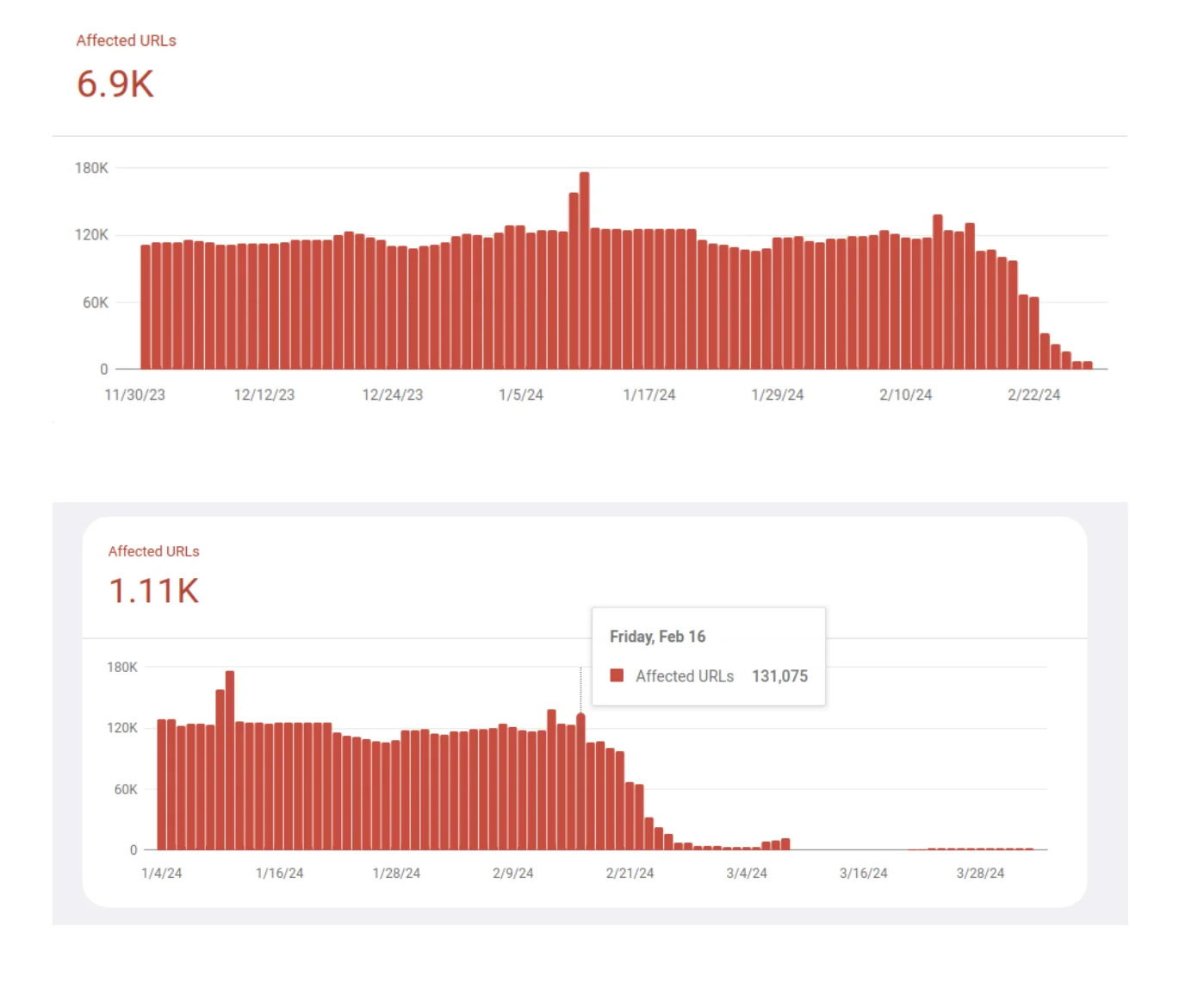
| Metric | Before | After | |--------|--------|-------| | Desktop URLs in Good zone | ~0% | 100% | | Mobile avg INP (OVP/CTP/ACP/BIP/SIP) | >500ms | 219.48ms | | Mobile median INP | >500ms | 220ms | | Affected URLs (Poor or Needs Improvement) | ~6,900 | ~1,110 | | Good URLs on Mobile | Near 0 | 218,000 | | INP reduction on major pages | — | 60–78% |
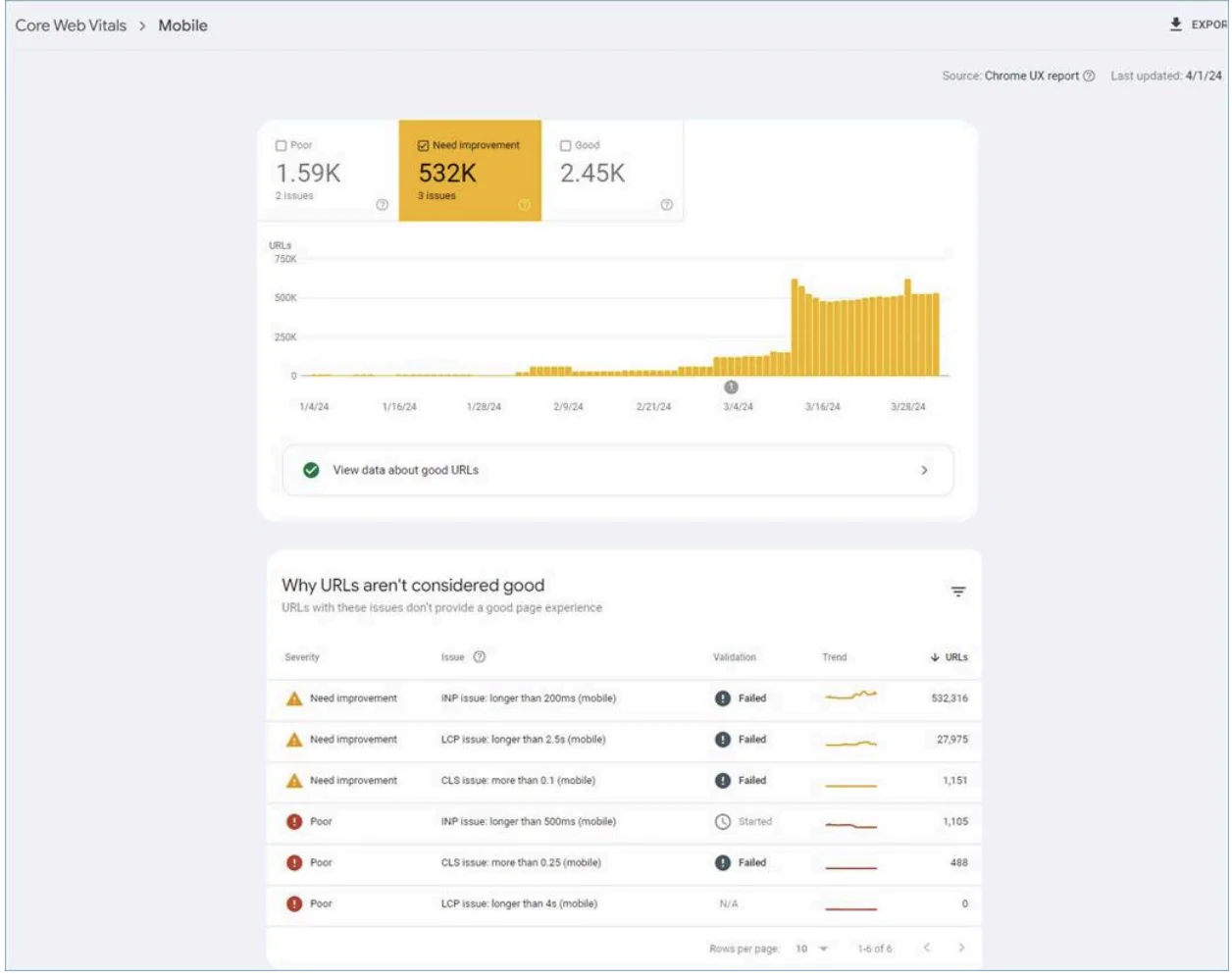
Meaningful improvement became visible in Google Search Console after March 2024, with a sharp rise in Good-zone URLs through May and June 2024. Desktop reached full coverage first — 100% of desktop URLs moved to Good. Mobile followed more gradually, with the large page buckets (OVP, CTP, ACP, BIP, SIP) reaching 219.48ms average and 220ms median.
What's still in progress
Three workstreams are active and not yet complete:
- Virtualization for long list pages — CTP and ACP/BIP/SIP pages render long scrollable lists. Virtual scrolling (windowing) is underway and should further reduce rendering cost on these page types.
- GTM container impact analysis — the full contribution of GTM tag firing to INP is still being measured; individual tags vary in their main thread cost.
- 6x–10x interaction slowdown investigation — a subset of interactions show outlier latency far beyond the average. Root-cause analysis is in progress.
Lessons learned
-
Separate your baseline from new work before diagnosing. Lazy loading, Akamai caching, and CSS optimization were all already in place — and INP was still above 500ms. Good LCP/CLS scores don't imply good INP. Different root causes, different fixes.
-
Main thread offloading gives the most improvement per engineering hour. Moving Clarity, GTM, and Pixel to Partytown wasn't trivial (Clarity requires proxy configuration), but the relief was immediate and visible in CrUX. If third-party scripts are your bottleneck, this is the first move.
-
Desktop Good doesn't mean mobile Good. Desktop hit 100% while mobile was still recovering. You need separate CrUX segments, separate baselines, and sometimes separate fixes.
-
A single average across 200k+ URLs hides everything. Some page type buckets were already near Good. Others were deep in Poor. Per-page-type segmentation is the only way to see where you actually stand.
-
The first optimization round is load-bearing, not final. The three in-progress workstreams above aren't edge cases — they're real user-facing problems the first round didn't fully resolve. Expect a second round.
Conclusion
Six months in: 218,000 mobile URLs in the Good zone, 100% desktop coverage. Starting from a platform where essentially nothing was Good.
What moved the needle: Partytown for analytics offloading, scheduler.yield() and startTransition for JS execution, reflow batching, and a yield before CSR navigation. Affected URLs dropped from ~6,900 to ~1,110.
Three workstreams are still running — virtualization for long list pages, GTM container analysis, and the outlier interaction investigation. This is a point-in-time snapshot, not a finished story.
If you're working through INP on a large React app, Google's INP documentation is the right starting point. If you've hit different walls or found a better approach — leave a comment.